
ELITE CORE / CORE ERP
One platform. Every order. Every team.
Promotional products ERP for distributors, print shops, and embroidery businesses.
From the first quote to the final invoice — everything connected.
- Quotes to fulfillment
- Artwork approvals
- Purchasing & production
- Finance & reporting
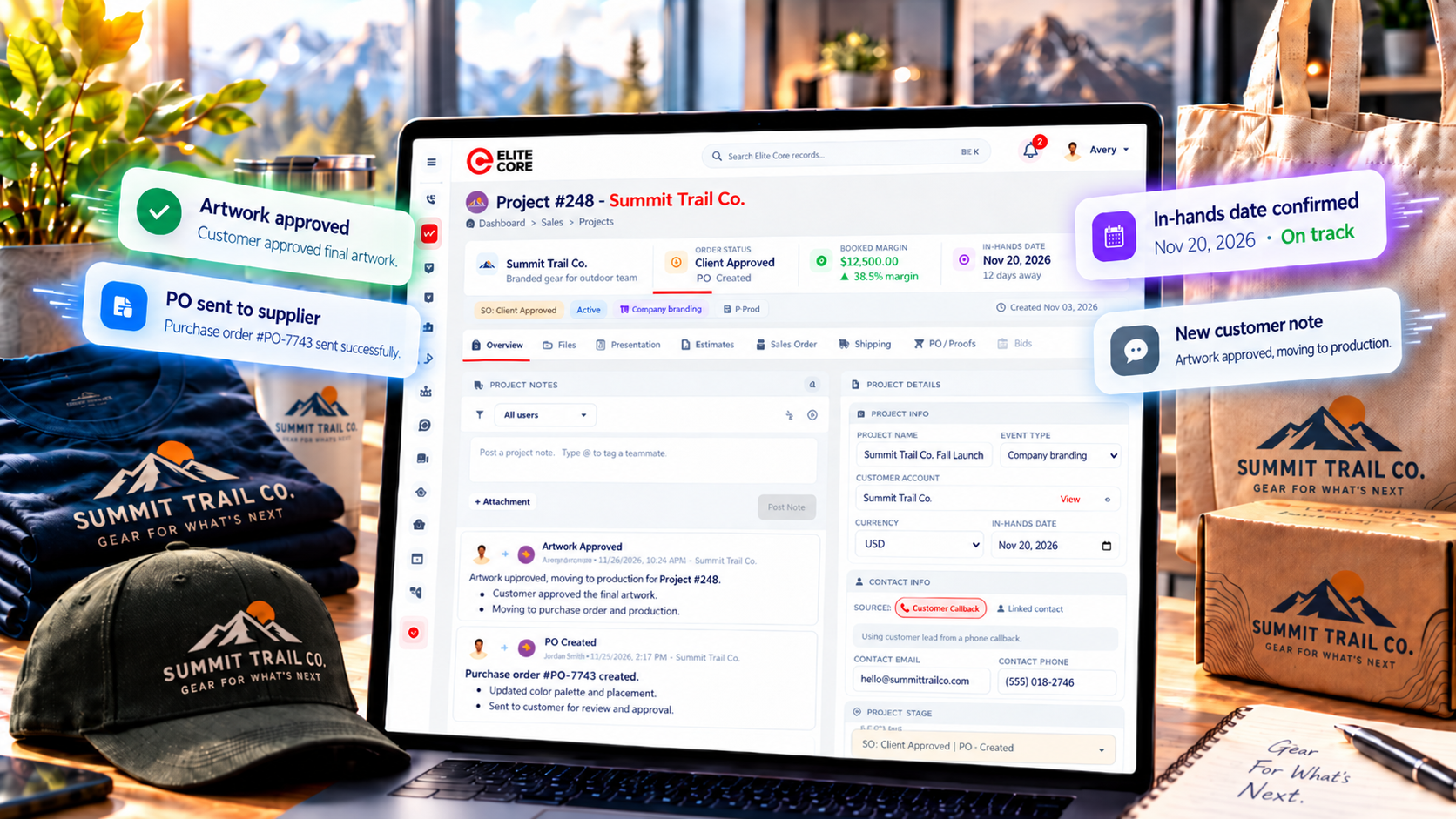
Built around real promotional products operations. From supplier purchasing and artwork approvals to production, shipping, and invoicing, Elite Core connects the people and details behind every order.
From the first customer conversation to the final invoice, Elite Core brings promotional products sales and operations into one connected ERP. Built for distributors managing branded merchandise, and relevant to print and embroidery teams coordinating custom-decorated orders.
Quote the job. Approve the artwork. Purchase the products. Track the work. Get it delivered. All with the project details together.
Explore the work behind every order
Start with the customer agreement. Follow through to supplier purchasing. Explore these Elite Core guides to see how the details stay connected.
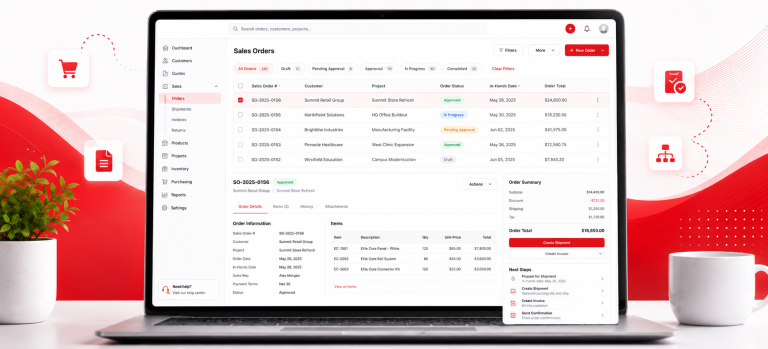
Start with a clear sales order
Products, sizes, quantities, decoration and customer approval belong together. See what to confirm before the job moves into purchasing.

Know what needs attention next
Find supplier purchase orders, review proof status and in-hands dates, and use saved views to organise the follow-up work.
Focus on running the business - not connecting the software
Picture a common order: a customer needs 300 embroidered polos, 200 printed tote bags, and delivery in time for an event. Sales needs prices and sizes. Purchasing needs two suppliers. Artwork needs logo files and approvals. Production needs to know what is ready. Finance needs to know what to bill.
Core ERP is the operational foundation of Elite Core, connecting those steps rather than asking your team to reconstruct the order from email chains and spreadsheets. A shared project brings customer information, estimates, sales orders, supplier purchases, proofing, shipping, and finance workflows into context.
It is especially relevant to promotional products distributors working with several suppliers and decorators, embroidery businesses managing decoration locations and artwork, and print shops juggling customer proofs, production steps, and delivery dates. The right fit depends on how your shop handles production; we recommend reviewing your actual workflow in a demo.
What changes when your order information is connected?
A request for a different shirt size should not become a surprise after the supplier PO has been sent. A revised logo should not be mistaken for the approved version. A partial shipment should not look like the entire job arrived. Core ERP gives each team a more consistent place to track the information and statuses that matter.
Explore promotional products ERP software or see how Elite Core handles supplier purchase orders.
One Core. Your entire operation.
In custom merchandise, a sale is only the beginning. The real challenge is getting dozens of small decisions right: the exact product variation, the correct logo placement, the supplier confirmation, the in-hands date, and the final amount invoiced.
1. Sales and quoting that lead somewhere
Start with customer records, product selections, presentations, and estimates. When a customer decides to move ahead, Elite Core supports converting estimates into sales orders instead of rebuilding the job from scratch. Guided sales-order approvals help capture decisions and change requests before the order progresses.
2. Artwork and decoration details attached to the order
One shirt may have a left-chest embroidery design; another may need a sleeve imprint. Elite Core supports artwork locations, proof uploads, customer approvals, and internal proof statuses. That means the team can distinguish customer approved from proofing complete and avoid treating every “looks good” email as a finished production handoff.
3. Supplier purchasing with accountability
Create purchase orders from sales-order information and track whether they are created, submitted, confirmed, awaiting follow-up, or received. When an order involves multiple suppliers, the purchase orders remain connected to the customer project. This is useful when blank garments come from one source and decoration happens somewhere else.
4. Receiving, production, and shipping with clearer status
If 180 of 200 units arrive, your receiving record should say exactly that. Elite Core supports partial receiving and quantity variances, alongside production workflow views and shipping information. Teams can focus on what is ready, what is waiting, and which delivery details still need attention.
5. Finance that understands the order
Track invoicing, applicable deposits, booked margin, and configured sales commissions in the same business context. Elite Core also provides QuickBooks Online-related finance workflows, including invoice exports, subject to your integration setup.
Read more about accounting and finance management and custom product management.
One real-world order, several teams, fewer loose ends
Customer: “We need 500 branded hoodies in two colours for our staff event.”
Sales: Builds the estimate, confirms sizes and colours, and sends the sales order for approval.
Artwork: Sends the logo proof, tracks requested changes, and records approval for the relevant decoration placement.
Purchasing: Generates and tracks the supplier purchase order, including any supplier or decorator shipping route.
Production and shipping: Follow what has arrived, what work remains, and where the finished merchandise needs to go.
Finance: Reviews the invoice, payment requirements, and margin rather than rebuilding the financial picture afterward.
The value is not a promise that every job runs itself. It is that the people completing the job can see the same story.
Why businesses choose Core ERP
- Everything in one place - Connect sales, purchasing, inventory, production, suppliers, shipping and invoicing in one system.
- Less duplicate work - Reduce repetitive data entry and unnecessary manual handoffs between departments.
- Better visibility - See what is happening across orders, purchasing, production and fulfillment without chasing updates.
- Faster workflows - Keep information moving automatically from one stage of the operation to the next.
- More accurate information - Give teams one shared source of truth instead of multiple spreadsheets and disconnected systems.
- Stronger collaboration - Keep sales, operations, purchasing, production and finance working from the same information.
- Better order tracking - Follow work from the initial order through purchasing, production, shipping and invoicing.
- Smarter decision-making - Use connected operational data and dashboards to understand performance and act faster.
Built around your kind of custom-product business
Different shops sell different things. They still need the same essentials: clear customer approvals, dependable purchasing information, organized production handoffs, and an accurate invoice.
Promotional products distributors
Put presentations, estimates, supplier POs, artwork, and fulfillment on the same project. Especially useful when one customer order involves multiple suppliers and decoration routes.
Embroidery & decoration
Keep imprint locations, artwork approvals, products, and production status together. Review any specialized digitizing or machine-scheduling needs during your demo.
Print shops
Coordinate quotes, art proofs, supplier purchases, job handoffs, and delivery expectations. Explore how your own screen-printing or other shop-floor processes would fit.
From customer request to finished order
Here is a practical way to picture the connected process. These are the stages your team can coordinate in Elite Core—not a claim that each step runs without review.
01 · Build the opportunity
Bring customer details and product choices into a presentation or estimate.
02 · Confirm the order
Create the sales order, collect approval, and handle customer change requests.
03 · Prepare the artwork
Attach decoration locations and proofs, then track review and approval.
04 · Purchase and fulfill
Generate supplier purchase orders, track receiving and production status, and coordinate shipping.
05 · Close the financial loop
Review deposits, invoicing, and booked margin in the order’s context.
Questions worth asking before you switch ERP
Buying operational software is a big decision. These are some of the practical questions we would ask, too.
Can Elite Core support more than one supplier on an order?
Yes. Supplier purchase orders can be tied to a shared customer project, making it easier to coordinate different products and destinations.
What if the customer asks for an artwork revision?
Elite Core supports artwork proof reviews and change requests. Teams can distinguish a revised proof from approved artwork before moving the job ahead.
Does Core ERP replace our accounting software?
Core ERP links operational and finance workflows. It also includes QuickBooks Online-related functionality, including invoice exports. Confirm the exact accounting integration requirements for your setup.
Is this suitable for a shop that performs its own decoration?
Elite Core supports decoration details, proofing, and production workflows. The best fit depends on your shop-floor requirements, so review a real production job with the team.
How do we move our existing customers over?
Customer import workflows can help bring records into Elite Core. Start with a review of duplicates, contacts, addresses, and assignment data before a production migration.
Your business already works as one system. Your software should too.
Who is Core ERP built for?
Promotional products distributors: Coordinate sourcing, presentations, estimates, customer approvals, purchase orders, outside decoration, drop shipments, and invoicing across a single customer project.
Embroidery and decoration businesses: Keep products, artwork placements, approvals, and internal production status connected. For specialized machine scheduling, digitizing, or stitch-level requirements, confirm the fit during a workflow demo.
Screen printing and print shops: Organize customer orders that involve artwork sign-off, decoration charges, suppliers, production handoffs, and delivery expectations. Core ERP supports shared order operations; particular shop-floor production needs should be evaluated against your processes.
Branded merchandise programs: Combine ERP operations with PromoStores for supported company-store and employee-merchandise programs.
What should you look for in promotional products ERP?
Do not stop at a feature list. Ask whether you can trace an order from the original customer request to its supplier POs and invoice. Test a revised proof, a late supplier confirmation, and a partial receipt. Ask how the software handles permissions, margins, and deposits when different team members own different stages.
Elite Core is designed around these connected workflows. It also supports role-based access, customer and supplier records, reporting views, and product data workflows that can include ASI information. Supported integrations and configuration requirements vary, so we can walk you through the relevant options.
Getting started without the guesswork
Bring a typical project and one complicated project to your demo. We will discuss how your team currently quotes, approves, purchases, produces, ships, and invoices; which customer or product records you need to import; and which integrations matter most. That is a much better foundation for evaluating an ERP than a slideshow full of buzzwords.
Ready to make your next order easier to manage? Talk with the Elite Core team about your promotional products, print, or embroidery workflow. You can also explore the frequently asked questions for more detail.
E L I T E C O R E
Built for the people behind every order.
Big operations take many hands. Elite Core brings every role together, so your team can see what needs to happen next and keep the work moving.
Different responsibilities. One connected team.