Shipping configuration in Elite Core does more than record where products are going. It determines how products are grouped into purchase orders, which suppliers receive those purchase orders, whether a decorator purchase order is required, and how goods move from the supplier to their final destination.
Understanding this relationship is especially important when an order contains multiple products with different decoration and shipping requirements.
The Core Rule
Elite Core creates purchase orders based on the physical route each product is expected to follow.
The system considers information such as:
- Product supplier
- Supplier shipping destination
- Decoration requirements
- Assigned decorator
- Decorator shipping destination
- Shipping method
- Shipping account
- In-hands date
Products are generally grouped on the same supplier purchase order when they use the same supplier and follow the same compatible supplier shipping route.
Products may be split into separate supplier purchase orders when their supplier shipping destinations differ.
A decoration route may also create a separate purchase order for the decorator.
Supplier Shipping and Decorator Shipping
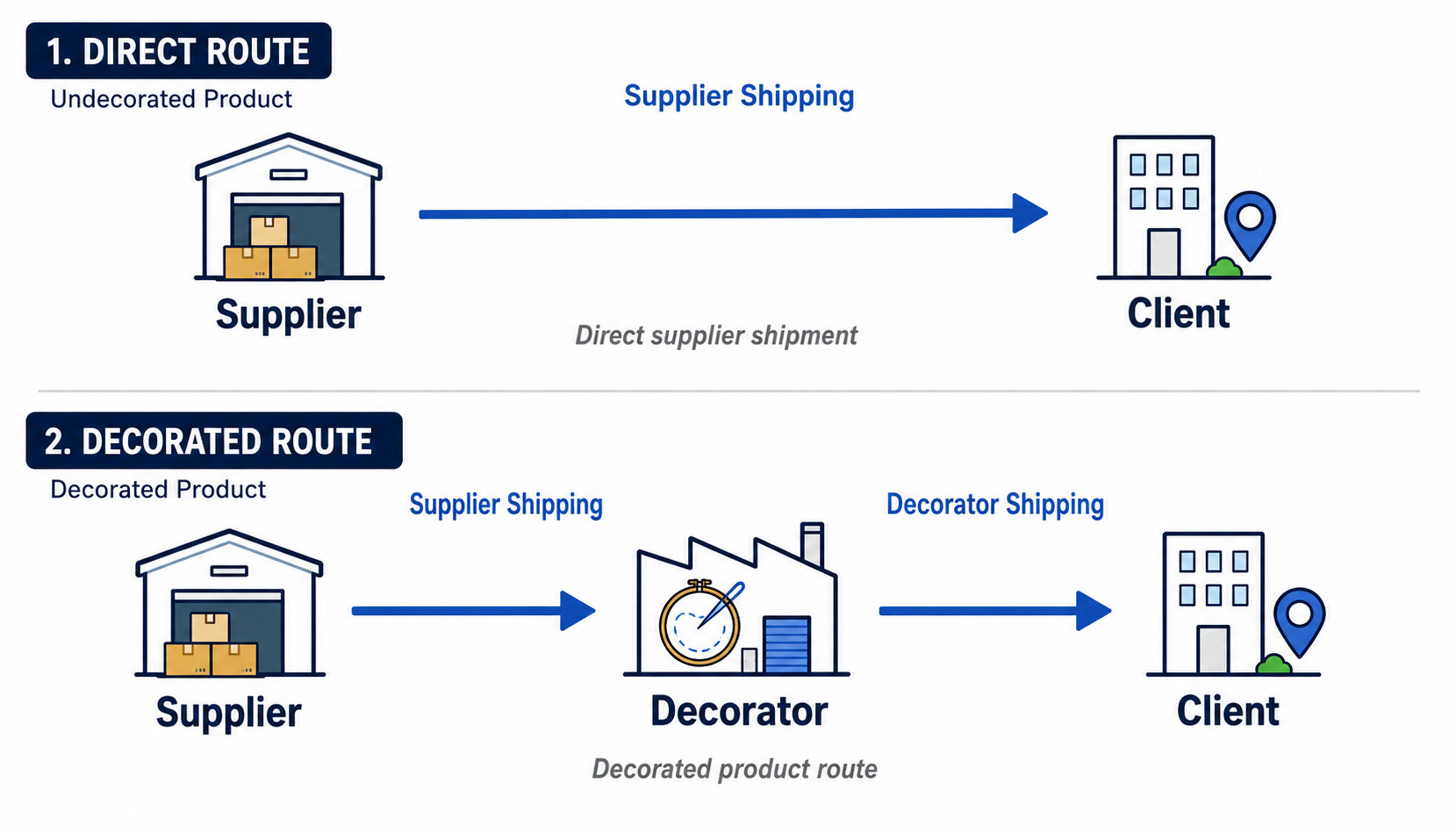
Each decorated product can have two shipping stages.
Supplier Shipping
Supplier Shipping determines where the product goes after leaving the goods supplier.
Common destinations include:
- Directly to the client
- To an external decorator
- To an internal Elite decoration department
- To another company location
Decorator Shipping
Decorator Shipping determines where the product goes after decoration has been completed.
Common destinations include:
- The client
- An Elite location
- Another decorator
- Customer pickup
- A final shipping or distribution location
A product that does not require decoration normally has only a Supplier Shipping route.
A product that requires decoration normally has both:
- A supplier route to the decorator
- A decorator route to the final destination
How Elite Core Determines Purchase Order Groups
Elite Core first identifies the goods supplier for each product.
It then evaluates the shipping and decoration route for each product and creates purchase-order groups.
The current purchase-order service creates separate supplier and decorator groups and then turns each final subgroup into a purchase order.
The destination is particularly important. When a shipping destination has a saved Ship To ID, Elite Core uses that identity when grouping the route. Two different Ship To records are therefore treated as different destinations, even when their written street addresses happen to be similar or identical.
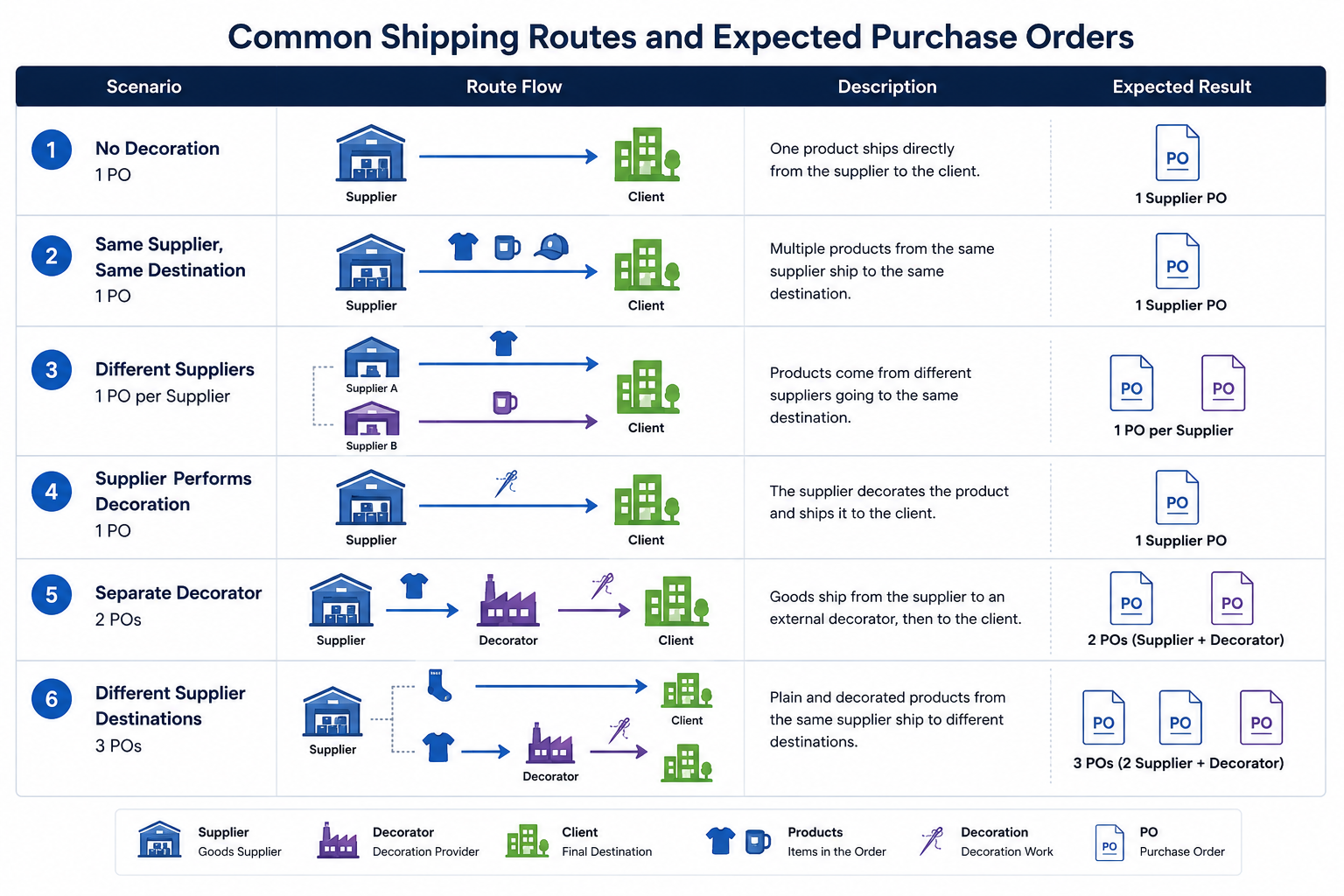
Common Shipping Configurations
| Scenario | Supplier route | Decorator route | Expected result |
|---|---|---|---|
| One product with no decoration | Supplier → Client | None | 1 PO |
| Multiple products from the same supplier going to the same destination | Supplier → Client | None | 1 supplier PO |
| Products from different suppliers | Each supplier → destination | None | 1 PO per supplier |
| Supplier performs the decoration | Supplier decorates and ships | Included with supplier work | 1 PO |
| Goods supplier and decorator are different | Supplier → Decorator | Decorator → Client | 2 POs |
| Internal Elite department performs decoration | Supplier → Elite Decorator | Elite Decorator → Client | 2 POs |
| Plain and decorated goods from the same supplier go to different destinations | One → Client; one → Decorator | Decorated item continues onward | 3 POs |
| Plain and decorated goods from the same supplier travel together to the decorator | Shared supplier shipment → Decorator | Decorated item continues onward | 2 POs |
Example 1: One Product, No Decoration
A customer orders socks that do not require decoration.
Shipping setup
- Supplier: S&S Canada
- Supplier Ship To: Client
- Decoration: None
- Decorator Shipping: Not required
Expected route
S&S Canada
↓
Client
Expected purchase orders
| Purchase order | Contents |
|---|---|
| S&S Canada PO | Socks |
| Total | 1 PO |
The socks appear on one supplier purchase order because there is no decorator involved.
Example 2: One Product with Decoration
A customer orders jerseys that require embroidery by Elite Decorations.
Shipping setup
- Supplier: S&S Canada
- Supplier Ship To: Elite Decorations
- Decoration: Embroidery
- Decorator: Elite Decorations
- Decorator Ship To: Client
Expected route
S&S Canada
↓
Elite Decorations
↓
Client
Expected purchase orders
| Purchase order | Contents |
|---|---|
| S&S Canada PO | Jerseys |
| Elite Decorations PO | Embroidery work |
| Total | 2 POs |
The supplier purchase order tells S&S Canada to provide and ship the jerseys to Elite Decorations.
The decoration purchase order tells Elite Decorations what work must be completed.
The current system creates a separate decoration group when the product is assigned to a different decorator, including an internal Elite decorator.
Example 3: Plain Socks Ship Directly, Jerseys Go to Decoration
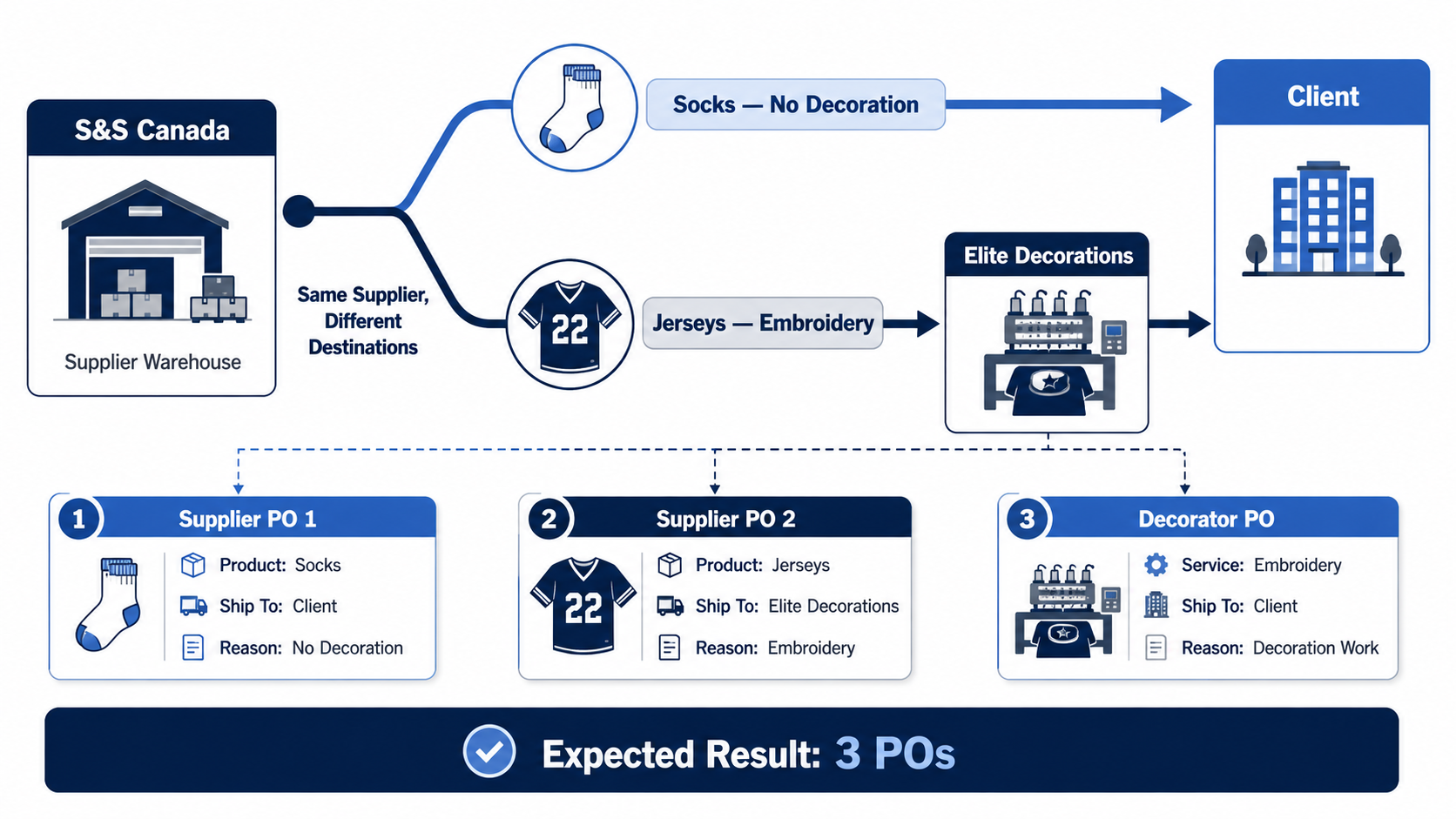
This is a common mixed-routing scenario.
The order contains:
- Jerseys requiring decoration
- Socks requiring no decoration
The socks will ship directly to the client.
The jerseys will ship from the supplier to Elite Decorations and then to the client.
Socks configuration
- Supplier: S&S Canada
- Supplier Ship To: Client
- Decoration: None
- Decorator Shipping: Not required
Jersey configuration
- Supplier: S&S Canada
- Supplier Ship To: Elite Decorations
- Decoration: Embroidery
- Decorator: Elite Decorations
- Decorator Ship To: Client
Physical routes
SOCKS

S&S Canada
↓
Client
JERSEYS
S&S Canada
↓
Elite Decorations
↓
ClientExpected purchase orders
| Purchase order | Contents |
|---|---|
| S&S Canada PO 1 | Socks shipping directly to the client |
| S&S Canada PO 2 | Jerseys shipping to Elite Decorations |
| Elite Decorations PO | Jersey embroidery |
| Total | 3 POs |
Even though both products come from S&S Canada, they are not one supplier shipment.
The socks and jerseys have different supplier destinations:
- Socks → Client
- Jerseys → Elite Decorations
Elite Core therefore treats them as separate supplier routes and creates separate S&S Canada purchase orders.
This is the correct result when the supplier will actually ship the products to two different destinations.
Example 4: Socks Travel with the Jerseys to Elite Decorations
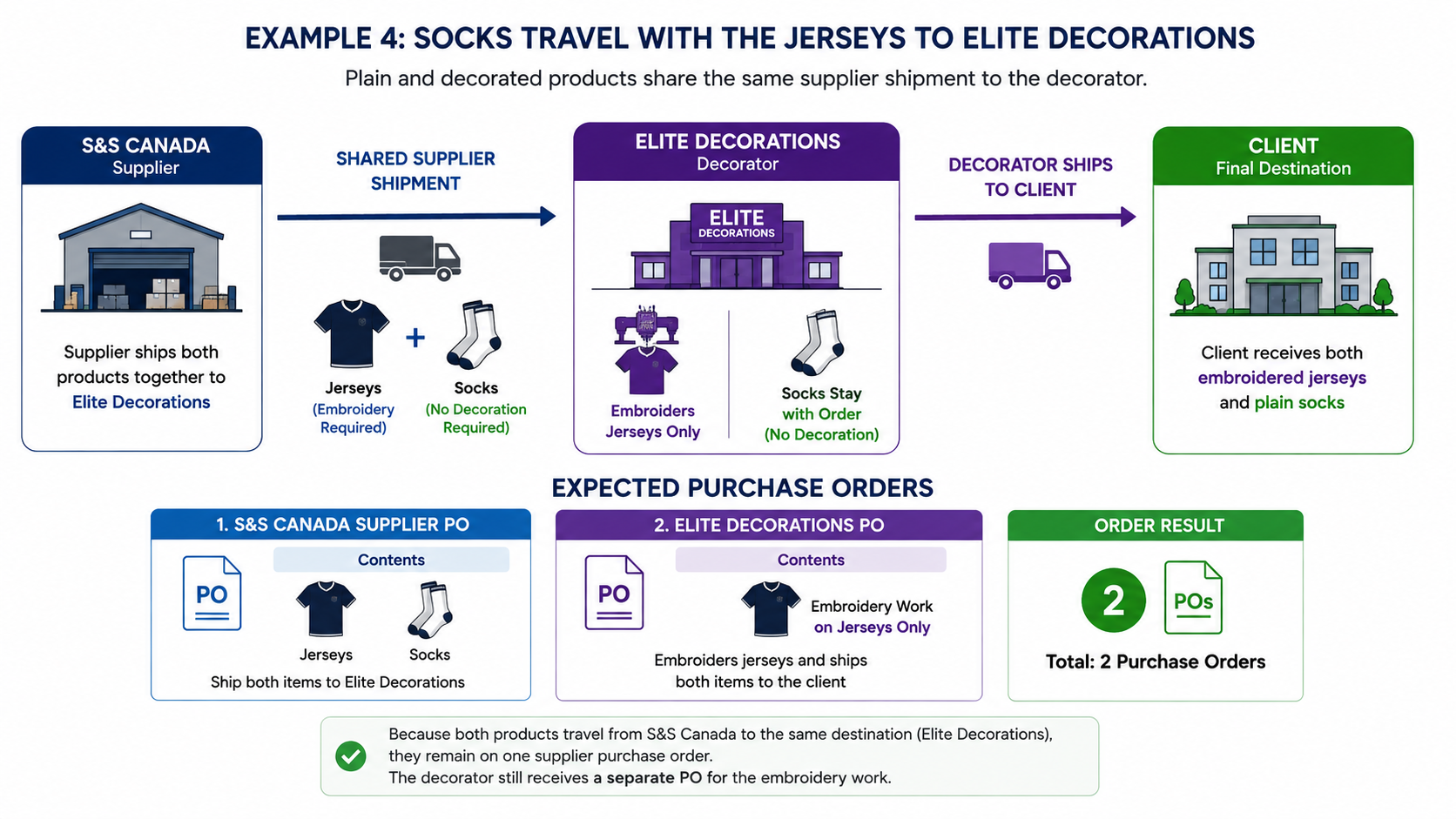
The same products can be configured differently.
Suppose Elite wants the socks and jerseys collected or delivered together. The jerseys require embroidery, but the socks do not.
Socks configuration
- Supplier: S&S Canada
- Supplier Ship To: Elite Decorations
- Decoration: None
- Decorator Shipping: Not required
Jersey configuration
- Supplier: S&S Canada
- Supplier Ship To: Elite Decorations
- Decoration: Embroidery
- Decorator: Elite Decorations
- Decorator Ship To: Client
Physical route
S&S Canada
↓
Elite Decorations
├── Jerseys: Embroidery required
└── Socks: No decoration required
↓
Client
Expected purchase orders
| Purchase order | Contents |
|---|---|
| S&S Canada PO | Jerseys and socks |
| Elite Decorations PO | Jersey embroidery |
| Total | 2 POs |
Both products can share the S&S Canada purchase order because the supplier is sending both products to the same destination.
Only the jerseys require decoration work.
Important: Undecorated Items on a Decorator PO
Some teams want an undecorated companion product, such as socks, to appear on the decorator purchase order for visibility.
For example, the decorator may need to know:
- The socks arrived with the jerseys
- The socks must be packed with the completed jerseys
- The socks require no decoration
- The full order must remain together
At present, Elite Core naturally adds products to a decorator group when those products have decoration routing assigned to that decorator. A product with no decoration does not automatically become a decorator PO line.
Some users work around this by adding a zero-dollar decoration line called:
BLANK
This makes the undecorated product appear on the decorator PO, but it is not the ideal long-term workflow because it creates what appears to be a decoration record when no decoration is actually required.
The intended future workflow should support a setting such as:
Include on decorator PO as a no-decoration companion item
The decorator PO could then show:
| Product | Decoration instruction |
|---|---|
| Jerseys | Embroidery |
| Socks | No decoration required — pack with completed order |
This would preserve visibility without creating a fake decoration charge, proof requirement, or production step.
Example 5: Same Supplier, Different Internal Elite Destinations
An order contains two products from S&S Canada:
- A plain trucker cap
- A Flexfit cap requiring embroidery
The plain cap is configured to ship to Elite Promo Marketing.
The decorated cap is configured to ship to Elite Decorations.
Although both internal destinations may use the same street address, they are saved as separate Ship To records.
Configuration
| Product | Supplier Ship To | Decoration |
|---|---|---|
| Trucker cap | Elite Promo Marketing | None |
| Flexfit cap | Elite Decorations | Embroidery |
Expected purchase orders under the current configuration
| Purchase order | Contents |
|---|---|
| S&S Canada PO 1 | Trucker cap → Elite Promo Marketing |
| S&S Canada PO 2 | Flexfit cap → Elite Decorations |
| Elite Decorations PO | Flexfit embroidery |
| Total | 3 POs |
The two S&S items do not group onto one purchase order because their supplier shipping records point to different Ship To records. Elite Core therefore treats them as two separate supplier destinations.
How to Reduce That Example to Two POs
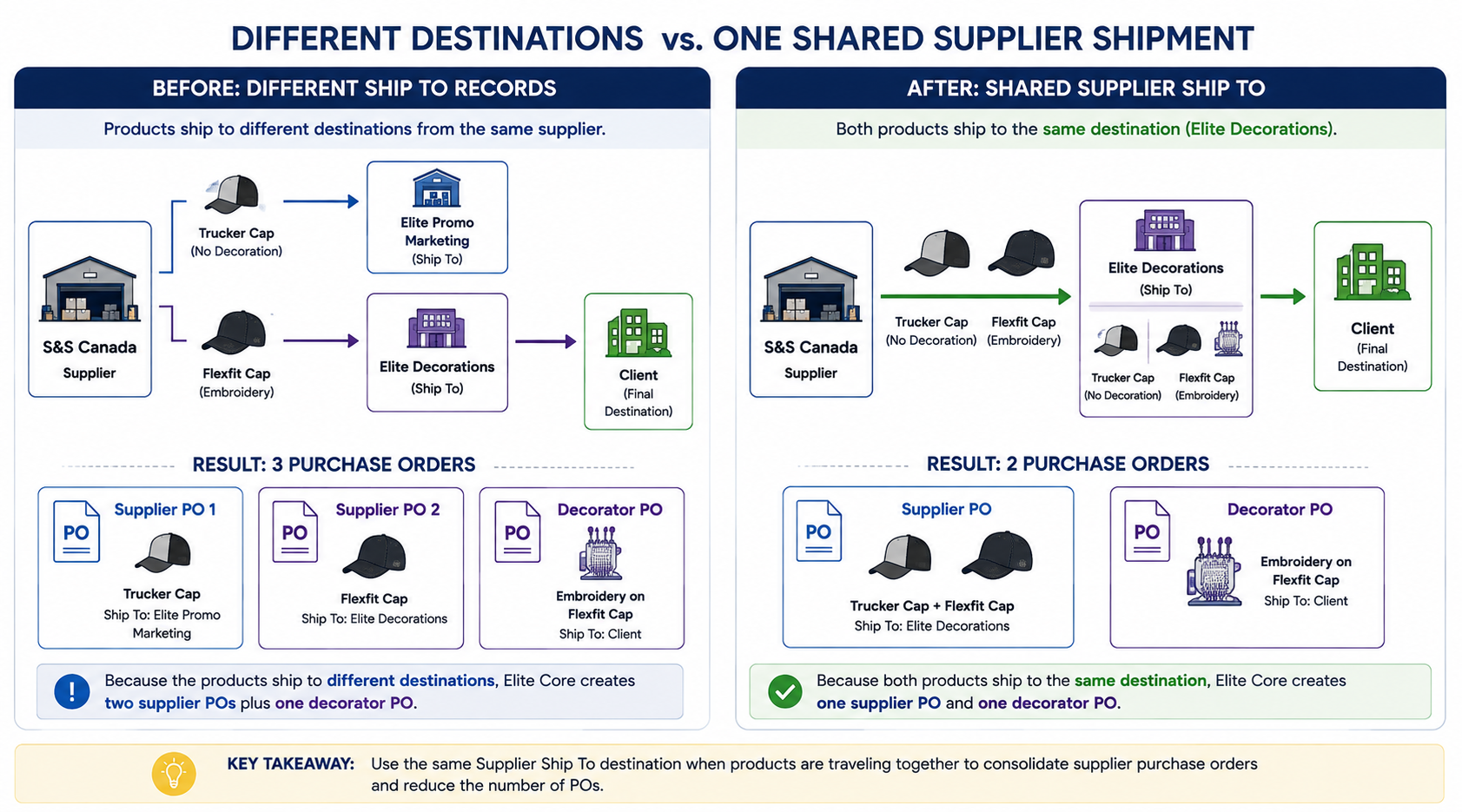
If both products are actually being collected or delivered together, configure both supplier shipping records to use the same supplier Ship To destination.
Revised configuration
| Product | Supplier Ship To | Decoration |
|---|---|---|
| Trucker cap | Elite Decorations | None |
| Flexfit cap | Elite Decorations | Embroidery |
The shipping methods and accounts should also be compatible when the products represent one physical supplier shipment.
Revised expected purchase orders
| Purchase order | Contents |
|---|---|
| S&S Canada PO | Trucker cap and Flexfit cap |
| Elite Decorations PO | Flexfit embroidery |
| Total | 2 POs |
The trucker cap does not need a fake decoration to join the S&S Canada goods PO. It only needs to share the supplier shipping destination with the decorated cap.
Same Address Does Not Always Mean the Same Shipment
Two Ship To records may share the same street address but still represent different operational instructions.
For example:
- Different departments
- Different contacts
- Different shipping accounts
- Different delivery methods
- Different pickup instructions
- Different required dates
- Different internal handling requirements
Elite Core should not assume that all products going to the same street address must be combined.
The shipping configuration should reflect the actual physical shipment.
Use one shared supplier destination when the supplier will release or ship the products together.
Use separate supplier destinations when the products are genuinely being shipped or handled separately.
Shipping Fields That Affect the Outcome
Supplier
The supplier determines which vendor receives the goods purchase order.
Products from different suppliers normally create different supplier POs.
Supplier Ship To
This determines where the goods supplier sends the product.
This is one of the most important fields for supplier PO grouping.
Products from the same supplier may still produce separate purchase orders when their Supplier Ship To records differ.
Supplier Shipping Method
This records how the supplier shipment is expected to move.
Examples include:
- Ground
- Best way
- Customer pickup
- Courier
- Supplier delivery
Where possible, products sharing one supplier shipment should use compatible shipping methods.
Supplier Shipping Account
This indicates which supplier, customer, company, or third-party shipping account applies.
Products using different accounts may represent different shipment instructions and should be reviewed before expecting consolidation.
Decoration Requirement
This determines whether the product requires decoration work.
A product with no decoration normally does not create a decorator purchase-order line.
Decorator
This determines who performs the decoration work.
A different decorator generally creates a separate decorator PO.
Decorator Ship To
This determines where the product travels after decoration.
Examples include:
- Client
- Elite Promo Marketing
- Another internal department
- Customer pickup
- Another decorator
In-Hands Date
The in-hands date identifies when the goods are required at the relevant stage.
Supplier and decorator routes may interpret this date differently depending on whether the goods are needed at the client or at the decorator.
Before Generating Purchase Orders
Review the following questions:
- Where should each product physically go after leaving the supplier?
- Does each product require decoration?
- If decorated, who is the decorator?
- Where should the product go after decoration?
- Are products from the same supplier travelling together?
- Do they use the same Supplier Ship To destination?
- Are the shipping methods and accounts compatible?
- Are any plain products supposed to travel with decorated products?
- Does the decorator need visibility of any no-decoration companion items?
Troubleshooting Unexpected Extra Purchase Orders
If Elite Core creates more supplier purchase orders than expected, compare the affected shipping records.
Check for differences in:
- Supplier ID
- Supplier Ship To ID
- Shipping method
- Shipping account
- In-hands date
- Decoration route
- Decorator
- Internal versus external destination
The most common cause is:
Products use the same supplier but have different Supplier Ship To records.
When that happens, Elite Core treats them as separate supplier routes.
Troubleshooting Missing Decorator Purchase Orders
If a decorator PO is missing, confirm that the decorated product has:
- A saved decoration
- An assigned decorator
- A production department where required
- Supplier shipping routed to the decorator
- Decorator shipping configured
- Complete decoration routing information
Elite Core validates internal decoration routes and requires the decorator, production department, decorator shipping route, and decorator destination to be present.
Recommended Shipping Strategy
Configure shipping according to the actual movement of the goods.
Use separate routes when:
- Products ship to different clients or locations
- Some products ship directly while others go to a decorator
- Different shipping accounts are required
- Different pickup or carrier instructions apply
- Different required dates apply
Use one shared supplier route when:
- Products come from the same supplier
- They leave the supplier together
- They go to the same receiving destination
- They use compatible shipping instructions
- Plain goods are intentionally travelling with decorated goods
Practical Rule
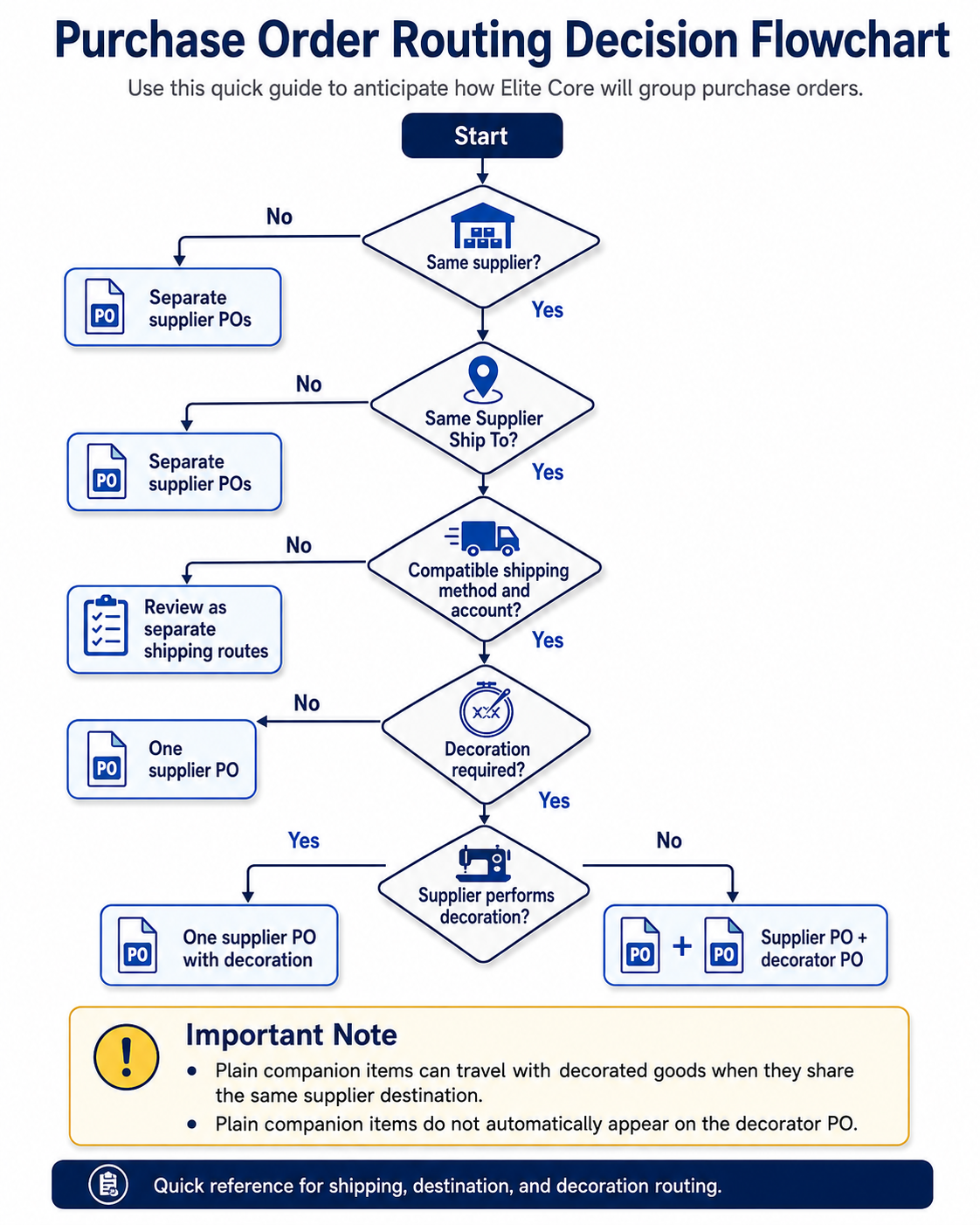
If products leave the supplier together in one shared shipment, they should generally share one supplier purchase order.
If their supplier destinations or physical shipment instructions differ, separate supplier purchase orders are expected.
Decoration determines whether an additional decorator purchase order is also required.
Quick Reference
| Question | If yes |
|---|---|
| Same supplier? | Products may share a supplier PO |
| Same Supplier Ship To? | Products are more likely to group |
| Different Supplier Ship To? | Separate supplier POs are likely |
| Decoration required? | A decorator PO may be created |
| Different decorator from supplier? | Supplier PO plus decorator PO |
| Plain item travelling with decorated goods? | Route both supplier legs to the same destination |
| Plain item must appear on decorator PO? | A companion-item feature is needed; avoid fake decoration where possible |
The complete map can be found below: