
A Client Invoice in Elite Core is the financial document that tells the customer what they are being billed for and how much remains payable. It normally follows the Sales Order and uses the approved order information as its commercial foundation, but it serves a different purpose. The Sales Order records what the client agreed to purchase, while the Invoice records the amount Elite is now charging the client.
The invoicing workflow is therefore the point where operational order information becomes an accounts-receivable obligation. Product quantities, selling prices, freight, additional charges, taxes, payment terms, deposits, and the remaining balance all need to be accurate before the Invoice is sent.
The Core Rule
An Invoice should represent the amount the customer is actually expected to pay at that point in the order lifecycle. It should not simply repeat the Sales Order without checking whether freight, additional charges, deposits, partial billing, taxes, or other changes affect the final amount due.
Before an Invoice is sent, the salesperson or finance team should be able to explain exactly how the Invoice total was calculated, which Sales Order it relates to, what has already been paid, and what remains outstanding.
What Is a Client Invoice in Elite Core?
A Client Invoice is the customer-facing billing record created from the commercial and operational information associated with the Project and Sales Order. It communicates the amount Elite is requesting from the customer and creates the financial record that will later be matched with customer payment.
The Invoice may contain the client billing address, shipping address, invoice number, payment terms, currency, in-hands date, products, quantities, selling prices, shipping charges, taxes, deposits, and amount due. Current Elite Core invoice rendering supports separate billing and shipping addresses, payment terms, currency, in-hands date, and an amount-due calculation that can differ depending on whether the document is a deposit invoice or another invoice type.
An Invoice is not simply a copy of the Sales Order. It is a financial document based on the approved order and the billing stage that has now been reached.
Sales Orders vs. Invoices
The Sales Order defines what the client ordered. It represents the commercial agreement and operational configuration that downstream teams rely on for purchasing, production, decoration, shipping, and fulfillment.
The Invoice represents what Elite is billing the customer. In many cases the Invoice will closely reflect the Sales Order, but the two records should not be treated as interchangeable. A Sales Order can remain operationally correct even when the Invoice must account for a deposit, final freight, a partial shipment, a progress billing arrangement, or another adjustment that affects what is payable now.
The easiest way to think about the distinction is that the Sales Order answers, “What did the client approve?” while the Invoice answers, “What are we asking the client to pay now?”
When Should You Create a Client Invoice?
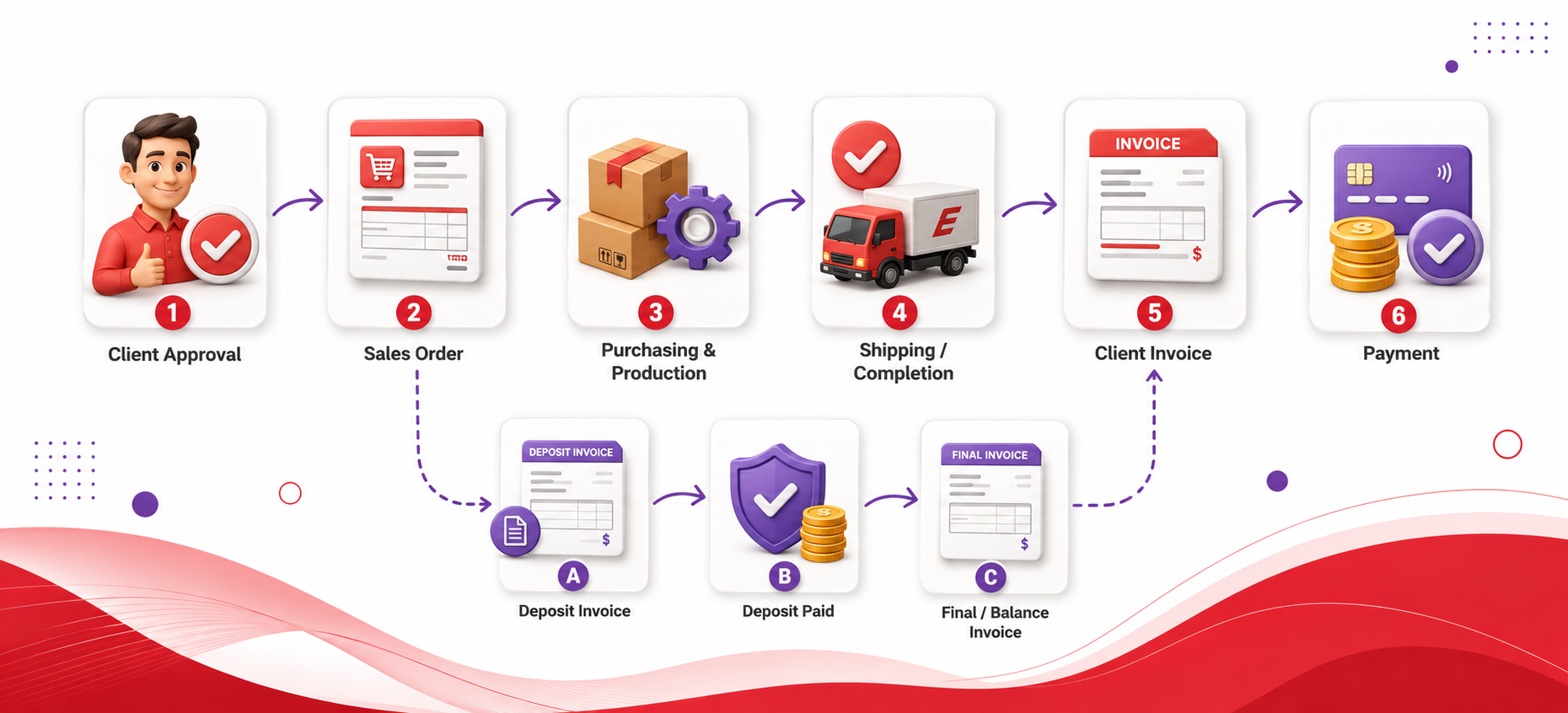
An Invoice should normally be created when the order has reached the billing stage required by the client’s terms and Elite’s internal process. The exact timing can vary. Some orders are invoiced after shipment or completion, while others may involve deposits, progress billing, partial billing, or other agreed arrangements.
Before invoicing, confirm that the Sales Order reflects the approved products, quantities, client pricing, freight expectations, and applicable charges. The billing and shipping addresses should be correct, the customer terms should be understood, and any deposit already collected should be identified. If the Invoice is intended to represent the final balance, actual freight and any approved additional charges should be reviewed before the amount due is finalized.
Do not create a final Invoice simply because purchasing has begun. The Invoice should match the billing event that has actually occurred.
How to Create an Invoice
Begin from the correct Project and open the invoicing area associated with the order. Locate the current Sales Order and confirm that you are working with the correct order revision before starting the Invoice. Elite Core supports invoice creation using Sales Order information, and the invoice workflow can select the applicable Sales Order revision rather than relying blindly on whatever order information happens to be visible elsewhere.
Start the Invoice using the available invoice-creation action. The exact label can vary with the current interface, so use the action currently presented in the Invoices area rather than relying on an older button name.
After the Invoice opens, review the customer, billing address, shipping address, payment terms, currency, invoice lines, quantities, prices, freight, taxes, deposit treatment, and amount due. Confirm that the Invoice represents the correct billing stage. If the client is being billed only for part of the order, do not allow the Invoice to imply that the entire Sales Order is being billed.
Save the Invoice only after the current amount due can be reconciled to the order and any prior payments.
How to Create an Invoice From a Sales Order
Creating an Invoice from a Sales Order allows the approved selling information to become the starting point for customer billing. Elite Core can use the selected Sales Order revision as the source for invoice creation, which is important when an order has been revised over time.
After the Invoice is created, review the transferred information instead of assuming the Sales Order and Invoice should be identical. Verify the products, quantities, descriptions, selling prices, taxes, shipping charges, terms, addresses, currency, and dates. If the order has deposits or prior invoices, verify how those amounts affect the current balance.
A Sales Order may contain information that is operationally important but not customer-billable at this stage, while an Invoice may contain billing adjustments that do not change the underlying Sales Order. The user should therefore review the Invoice as a new financial record rather than treating invoice generation as a simple document-copy operation.
How to Fill Out a Client Invoice Correctly
The Invoice header should identify the correct customer and order context. Confirm that the billing address is the address the customer expects for accounts-payable purposes and that the shipping address reflects the delivery destination when it is shown on the Invoice. Elite Core’s generated Invoice layout treats billing and shipping as distinct address fields, so both should be reviewed separately.
The payment terms should reflect the agreed customer terms. If the Invoice is due immediately, the terms should communicate that. If the customer has approved credit terms, the Invoice should reflect the applicable arrangement. The currency must also be correct because the Invoice total, amount due, taxes, and payment expectations all depend on it.
The in-hands date can appear on the Invoice and should be reviewed for accuracy when it is meaningful to the customer or the Project record. The Invoice number identifies the billing document and should remain stable once the Invoice has entered accounting use.
The line-item section should show the products and billable services that belong on this Invoice. Each description, quantity, unit price, and extended amount should be checked. Shipping, extra charges, and taxes should be included according to the actual billing arrangement rather than copied mechanically from an earlier estimate.
The amount due is the most important final number. It must reflect the Invoice amount after deposits, prior payments, or other applicable adjustments.
How to Review Invoice Line Items
Review each Invoice line against the Sales Order and the billing event. Confirm that the correct products are being billed, that quantities have not accidentally reverted to an earlier Sales Order revision, and that the client selling price is still correct.
If the Invoice is for the full order, the combined product quantities and charges should reconcile to the approved commercial order, subject to legitimate adjustments such as actual freight. If the Invoice is partial, only the products, quantities, milestones, or amounts being billed now should appear.
Descriptions should be customer-readable. Internal purchasing information, supplier costs, decorator costs, or private operational notes should not appear as client-facing invoice content unless there is a specific approved reason.
How to Add Shipping to an Invoice
Final shipping or freight charges should be added when the client is responsible for those costs and the amount is known or sufficiently confirmed for billing. If the Sales Order contained estimated freight and the actual shipping charge differs, use the approved final customer billing amount rather than leaving an obsolete estimate in place.
Before adding freight, confirm whether shipping was already included in product pricing, included as a separate Sales Order charge, prepaid by the client, charged to a client courier account, or intended to be absorbed by Elite. Adding another shipping line without checking these conditions can result in double billing.
When a shipping amount is billed separately, use a clear description so the client understands what the charge represents.
How to Add Additional Charges to an Invoice
Additional charges belong on the Invoice when they are legitimately part of what the customer has agreed to pay. Examples can include rush service, packaging, kitting, personalization, special delivery, additional artwork, or other approved services that were not already included elsewhere.
Before adding an extra charge, determine whether it was authorized by the client and whether it already appears in the Sales Order or another line. The Invoice should not become a place to recover unexpected internal cost overruns that were never approved as client charges.
If an additional charge changes the commercial agreement materially, confirm whether the Sales Order should also be updated so the operational and billing records remain consistent.
How Taxes Work on Client Invoices
Invoice tax should reflect the applicable customer, jurisdiction, products, services, shipping, and company tax configuration. Elite Core’s invoicing system includes tax-handling logic and supports accounting export behavior, so tax should be treated as part of the formal financial record rather than an informal surcharge.
Before sending the Invoice, review the taxable subtotal, tax amounts, tax jurisdiction, and total. If the customer is tax-exempt or a particular charge should receive different treatment, confirm that the underlying customer and transaction configuration supports that result.
Do not manually change tax simply to make the Invoice match an expected total without understanding why the system calculated a different amount.
How Client Deposits Appear on the Final Invoice
A client deposit represents money received before the final balance is due. Elite Core supports deposit-related invoice roles and can distinguish a deposit Invoice from a later balance or final Invoice. This allows the amount due on a deposit document to be handled differently from the remaining balance due on the order.
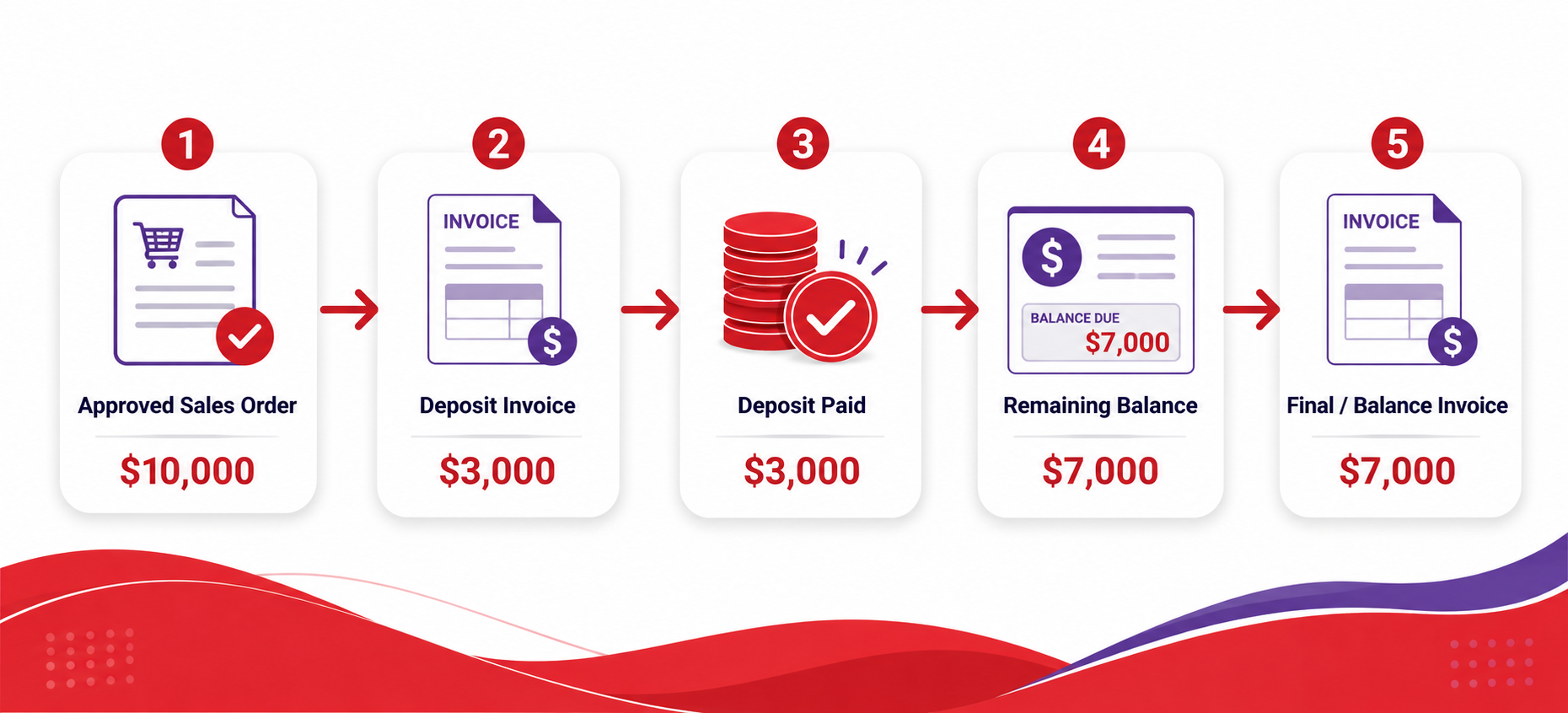
When the customer has already paid a deposit, the final billing process should make that prior payment visible in the financial calculation so the client is not asked to pay the same amount twice. The final or balance Invoice should therefore reconcile the full order value with the amount already collected.
For example, if the approved order is $10,000 and the customer previously paid a $3,000 deposit, the final billing stage should account for that deposit and leave the appropriate remaining amount rather than presenting the entire $10,000 as newly payable.
How to Apply a Deposit to an Invoice
When a prior deposit exists, confirm that it belongs to the same customer and Sales Order and that the payment has actually been recorded. The deposit relationship should be preserved so the current Invoice can calculate the correct remaining payable amount.
Do not manually reduce product prices to mimic a deposit. A deposit is a payment against the order, not a discount. Reducing line prices can distort revenue reporting, taxes, margin, and the customer’s understanding of what was purchased.
If the amount due does not reflect the expected deposit, review the deposit Invoice, payment status, Sales Order relationship, and current invoice role before sending the final Invoice.
How to Create a Partial Invoice
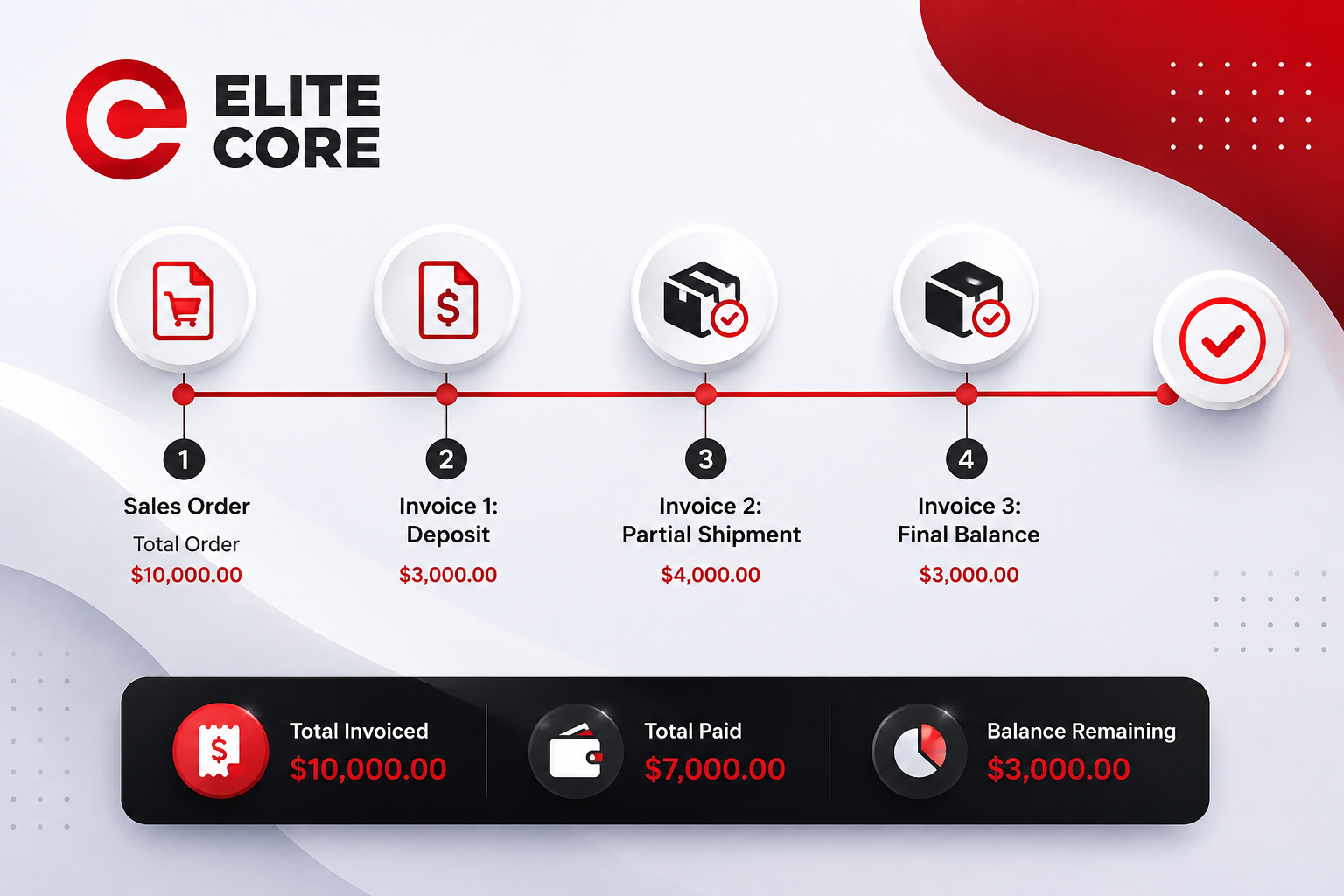
A partial Invoice is appropriate when only part of the Sales Order is being billed. This can happen when part of the order ships early, when work is billed by milestone, when a client requests staged billing, or when an order includes separate deliverables with different billing dates.
The partial Invoice should clearly represent only the portion being billed now. Confirm the included products, quantities, services, freight, and taxes. The remaining unbilled portion should still be identifiable so that later invoices do not duplicate or omit amounts.
Partial invoicing should preserve the connection to the original Sales Order. The combined value of all invoices associated with the order should be monitored so the customer is not overbilled.
How to Create Multiple Invoices for One Sales Order
One Sales Order may legitimately produce several Invoices. Progress billing, deposits, partial shipments, milestone billing, split delivery schedules, or separate final balances can all require more than one billing document.
Each Invoice should have a clear purpose and should represent a distinct portion of the total commercial obligation. The user should be able to explain which amounts have already been invoiced, which have been paid, which remain open, and which portion of the Sales Order has not yet been billed.
When creating a later Invoice, review the earlier Invoice history before adding products or charges. Multiple Invoices are useful only when they preserve a clear cumulative billing record.
How to Review an Invoice Before Sending It
Before sending the Invoice, confirm the customer identity, billing address, shipping address, payment terms, currency, invoice date information, and Sales Order relationship. Then review every billable line against the approved order and the current billing event.
Confirm that quantities, prices, freight, additional charges, taxes, deposits, and the amount due are correct. If previous invoices exist, review them so the current Invoice does not repeat an earlier billed amount. If a deposit has been paid, confirm that the payment affects the current balance correctly rather than being treated as a price reduction.
Preview the customer-facing Invoice itself before sending. The generated document should be reviewed for readable descriptions, correct addresses, correct totals, accurate terms, and the absence of internal-only notes or costs.
The final question should be simple: if the customer pays exactly the amount shown as due, will their account be correct for this billing stage?
How to Send an Invoice to a Client
After the Invoice has been reviewed, use the available client-delivery workflow in the current Elite Core interface. Confirm the intended billing contact before sending and ensure the current Invoice version is the one being delivered.
The customer should receive the Invoice information needed to understand the charge and make payment. Depending on the configured payment workflow, this may include the Invoice document, amount due, payment terms, and available payment instructions or payment options.
After sending, confirm that the Invoice remains associated with the correct Project and customer and monitor the payment status through the appropriate financial workflow.
How to Resend a Client Invoice
If the client requests another copy, resend the existing Invoice rather than creating a duplicate billing record. Confirm that the Invoice being resent is still the correct current document and that no replacement, correction, or void has been created since the original send.
Use the current invoice-delivery action to send another copy to the appropriate contact. If a different contact is receiving the resend, verify the address before sending.
Resending an Invoice should not alter the amount, create a new invoice number, or change the financial history unless the Invoice itself is being formally revised.
How to Edit an Invoice
An Invoice may need correction when customer details, addresses, descriptions, quantities, charges, taxes, terms, or other information are wrong. The appropriate editing approach depends on how far the Invoice has progressed.
Before making a change, determine whether the Invoice has already been sent, paid, exported to accounting, synchronized with a payment platform, or otherwise used in downstream financial records. Changes that are harmless on a draft Invoice can create reconciliation problems after accounting activity has occurred.
If the Invoice has not yet entered downstream accounting use, correct the underlying information and review the revised amount due. If payment or accounting activity already exists, use the controlled correction process supported by the current finance workflow rather than silently rewriting financial history.
How to Void or Cancel an Invoice
An Invoice should be voided or cancelled when the billing document should no longer remain collectible, such as when it was created in error, replaced by a corrected Invoice, or the underlying transaction was cancelled.
Before voiding or cancelling, review whether the Invoice has been sent, partially paid, fully paid, exported to accounting, connected to a deposit, used in payment processing, or included in customer statements. Those connected records determine whether a simple cancellation is sufficient or whether finance needs to record a more formal reversal or credit.
Do not delete or recreate financial records merely to make the screen look cleaner. Preserving a clear audit trail is more important than eliminating an incorrect historical document from view.
Common Invoice Problems
Common problems usually begin when the Invoice is treated as an automatic copy of the Sales Order rather than as a financial record that needs its own review. Old quantities, outdated selling prices, estimated freight, missing deposits, incorrect taxes, or duplicate additional charges can all create an incorrect amount due.
Another common problem occurs when partial or multiple invoices are created without reviewing what has already been billed. In that situation, a later Invoice may unintentionally duplicate products or charges from an earlier billing stage.
If an Invoice total looks wrong, compare the current Invoice to the applicable Sales Order revision, prior invoices, deposits, shipping charges, taxes, and payment history before changing individual line items.
Recommended Invoicing Strategy
Treat every Invoice as a financial snapshot of what the customer owes at a specific point in time. Start from the approved Sales Order, but deliberately review the information that can change between order approval and billing, especially freight, additional charges, taxes, deposits, and partial billing.
Keep deposit and balance logic separate from discounts. Keep partial invoices connected to the original Sales Order. Preserve prior Invoice history rather than recreating documents casually. Review the generated customer-facing document before sending, and avoid editing invoices after accounting or payment activity without understanding the downstream impact.
Practical Rule
The Sales Order should tell the business what the client agreed to buy, while the Invoice should tell the client exactly what they need to pay now.
If the amount due cannot be reconciled to the Sales Order, prior invoices, deposits, approved charges, freight, and taxes, the Invoice is not ready to send.
Quick Reference
Create the Invoice from the correct Sales Order revision, then verify the billing and shipping addresses, terms, currency, line items, quantities, prices, freight, taxes, deposits, and amount due. Use partial or multiple Invoices only when the billing structure requires them, and always review previous invoices before creating the next one. Resend an existing Invoice when the client only needs another copy. Edit, void, or cancel carefully once payment or accounting activity exists.